In this article
Affiliate disclosure: Some links in this article are affiliate links. We may earn a commission if you buy through them, at no extra cost to you. It never changes our verdict.
Pros and cons
Pros
- The best foldable hinge I’ve used
- Split-screen gestures make switching apps easy
- Thoughtful layouts in apps such as Outlook
Cons
- The inner screen loses contrast in bright sunlight
- The cover screen feels cramped despite the phone’s width
- Touch ID doesn’t work while the screen is off
- The weight and thickness add up during quick errands
Design
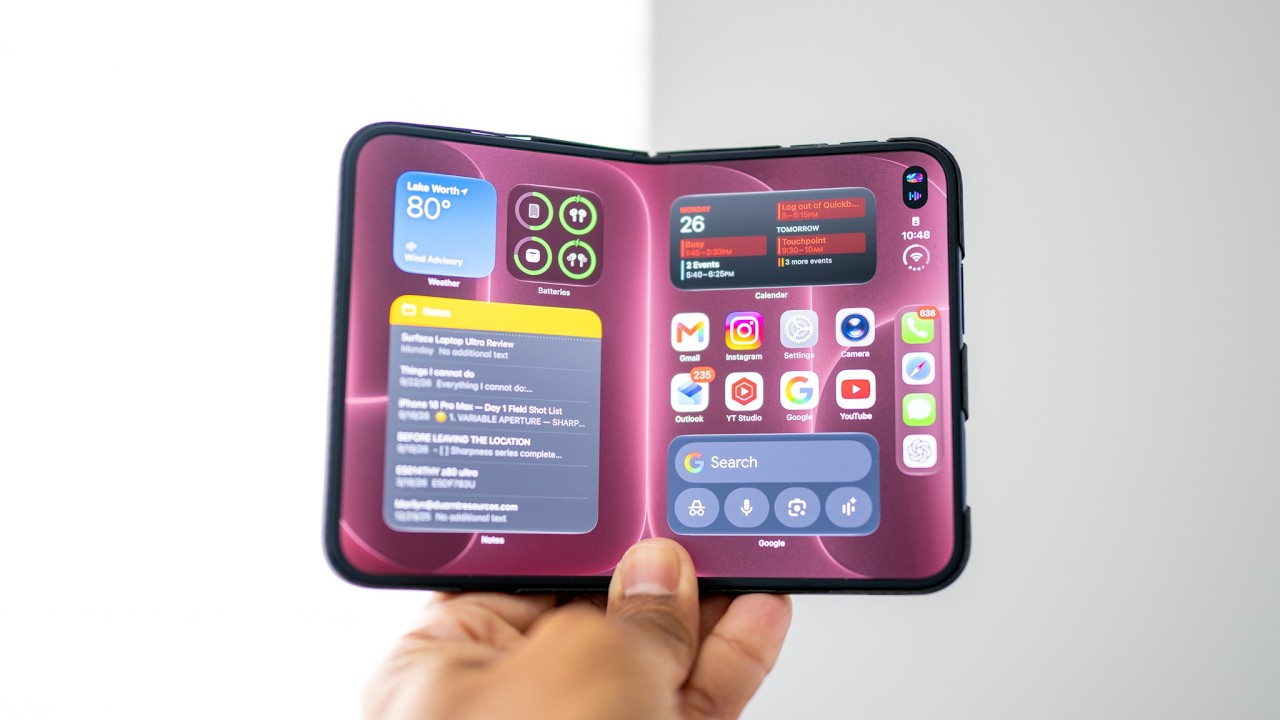
The iPhone Duo’s hinge is the best I’ve used
Watch this part of the video, from 0:21Opening the iPhone Duo is genuinely satisfying. Its magnets take some force to pull apart, but the hinge loosens once I’m past them, tightens again around halfway and holds several positions before snapping fully open. I haven’t used a better foldable hinge.
The transition as I fold the phone feels almost magical. I first wondered whether Apple was using motion sensors on one side, but the effect works when I close it from either side. My guess is that a sensor measures the hinge angle.
I naturally put my thumb near the top right for leverage. That leaves the power button lower than I’m used to, so I registered more of the center of my thumb for Touch ID. The volume buttons on top felt awkward in landscape at first, but after over 24 hours their placement became second nature.
Display
The nano-texture screen looks better indoors than in sunlight
Watch this part of the video, from 2:14I expected to hate the iPhone Duo’s nano-texture inner screen more than I do. Indoors, the colors still look vibrant, though the glossy cover screen looks sharper and has better microcontrast. In direct sunlight, the trade-off becomes much harder for me to ignore.
Bright light makes the inner screen’s blacks look gray and the image washed out. The small glossy area around the selfie camera looks much darker by comparison. My guess is that Apple left that area glossy to avoid affecting the camera image. On the plus side, I don’t see reflections on the nano-texture surface, and the finish helps hide the crease.
Multitasking
Split screen makes two apps feel easy to use
Watch this part of the video, from 3:55The iPhone Duo has the best two-app split screen I’ve used. I swipe an app left or right and it sticks; each side then has its own working navigation gestures. I can go home on one side, choose another app and leave the other side alone. It takes me more effort to switch apps this way on the Android foldables I’ve used.
The side menu also moves to whichever edge suits the app’s position. I’m fine with the two-app limit, even though some Android foldables allow more apps at once. I do miss floating windows.
Apps
Some apps embrace the Duo, while others waste its screen
Watch this part of the video, from 5:12Microsoft Outlook is one of the best examples I’ve found on the iPhone Duo: it adapts well to the cover screen, the inner display and different orientations. Fidelity is more enjoyable for me to use here, too. I wish more apps made that effort.
Ticketmaster instead looks like an iPhone app with huge black bars, even on the smaller screen. Positive Grid Spark brings up its iPhone app despite having an iPad app; I don’t know why it doesn’t use that layout here. Safari gives me tabs and a desktop-like interface on the inner display, but reading modern sites on the cover screen is another story.
Cover screen
The cover screen is where the iPhone Duo loses me
Watch this part of the video, from 6:25The iPhone Duo’s cover screen isn’t pleasant enough for how often I need it. I can’t practically walk around using the inner display, so I spend a lot of time with the phone closed. Despite the Duo being wider than my iPhone 18 Pro Max, the usable cover screen looks smaller and narrower to me.
Apple leaves space beside the app layout that I can’t fill with more apps. I assume it’s trying to keep a regular iPhone’s aspect ratio, but I don’t think that works here. In Safari, text on many modern sites is small and ads can occupy most of the readable area. I had a similar browsing complaint with the Z Fold 8, so this isn’t unique to Apple.
Typing
Messages and the split keyboard get the small details right
Watch this part of the video, from 8:04Messages makes typing on the short cover screen feel less cramped than I expected. Its translucent keyboard and text box let me see the conversation behind them, and a quick swipe gets the keyboard out of the way. I’ve seen a similarly good approach in the supported ChatGPT app.
Folding the phone slightly to summon the split keyboard gives me an awkward typing angle. I’d rather turn the split keyboard on full-time in landscape. Its autocorrect suggestions sit close to my right thumb, which is a lovely detail. In portrait, the regular keyboard returns, and my thumbs can reach it comfortably.
Unlocking
Touch ID works quickly, once the screen is awake
Watch this part of the video, from 9:20I sometimes appreciate the iPhone Duo’s Touch ID when Face ID on my regular iPhone would struggle with something covering my face. My ideal iPhone would have both. Here, though, the fingerprint sensor can add a pause when I pull the phone out of my pocket.
A light touch unlocks the Duo, but I have to hold a little longer to reach the home screen. More confusingly, Touch ID won’t register my finger while the screen is off, even when the always-on display makes it look ready. Once I tap to wake the screen, it responds instantly. I’d like Apple to let it work without that extra step.
Daily use
The weight and thickness make quick tasks feel less quick
Watch this part of the video, from 10:45The iPhone Duo feels fairly heavy to me, and I don’t think its titanium is necessary; I’d have been fine with aluminum if that reduced the weight. At the grocery store, repeatedly pulling it out for my list, unlocking it and putting it away made the weight and thickness more noticeable. A case adds still more thickness.
Thinborne and PITAKA sent me the cases I used. I’ve enjoyed them, and if I keep the Duo, I’d use a thin case. I also use a PITAKA case on my iPhone 18 Pro Max.
The choice
Why I still prefer a regular iPhone
Watch this part of the video, from 11:34The iPhone Duo rewards me when I can stop and use its inner screen. I’m usually on the go, so I mostly get its less enjoyable cover screen instead. With my iPhone 18 Pro Max, I pick it up in portrait and do what I need without thinking about how to hold or fold it.
I can see the Duo making more sense if you commute or travel and have time to use that larger display. My years of trying to make foldables my main devices have usually ended the same way: after the novelty wears off, I’d rather carry a regular phone and a laptop.
Common questions
Is the iPhone Duo good for multitasking?
Yes. The iPhone Duo has the best two-app split-screen implementation I’ve used on a foldable. I can swipe an app to either side, then use navigation gestures independently on each half to switch apps without disturbing the other. I’m fine with two apps at once, though I miss the floating windows I’ve used on Android foldables.
Is the iPhone Duo’s inner screen easy to see outdoors?
I like the iPhone Duo’s nano-texture inner screen indoors more than I expected: its colors still look vibrant, though the cover screen looks sharper. In direct sunlight, the inner screen loses a lot of contrast and blacks look gray. I don’t see reflections on it, and the finish helps hide the crease.
Does Touch ID work when the iPhone Duo’s screen is off?
No. I have to wake the iPhone Duo’s screen before Touch ID registers my finger, even if the always-on display makes the phone look ready. Once I’ve tapped the screen awake, a light touch unlocks it; I hold a little longer to get to the home screen. That extra step sometimes slows me down.
Should I switch from an iPhone 18 Pro Max to the iPhone Duo?
I wouldn’t make that switch for my own day. The iPhone Duo’s hinge and split screen are excellent, but I’m on the go too much to spend long on its inner display. I end up using the cover screen, which I find cramped. I’m happier picking up my iPhone 18 Pro Max and using it without thinking about its orientation.
Who should buy it?
Buy it if…
- You commute or travel and have time to use the larger inner screen.
- You want two apps side by side with easy, independent navigation.
Skip or wait if…
- You’re often on the go and would spend most of your time on the cover screen.
- You want a lighter phone that’s easy to pull out and use for quick tasks.
Final verdict
I love the Duo’s ideas, but I’d keep my regular phone
Apple has done a lot right with the iPhone Duo, especially its hinge and multitasking. There are first-generation frustrations I’d like it to work out, but even fixing those might not make a foldable my main phone. For the way I use a phone, I’m still happier with my iPhone 18 Pro Max.
Buying options
Linked in the video
Prices and configurations change often, so check the current price with the retailer.
- PITAKA cases Shop PITAKA on Amazon
- PITAKA iPhone 18 cases Shop at PITAKA
- Thinborne iPhone cases Shop at Thinborne
These are affiliate links.